

Need help displaying data? Click below or visit the Data guide to learn more.
Downloading data
The Vermont Community Profiles are displayed using Tableau, a software that creates interactive data visualizations. These visualizations or "vizzes" are controlled by filters, allowing users to select only the information that interests them. Data can be downloaded for other uses using the Download button on the Tableau toolbar at the bottom of the page in the following download options:
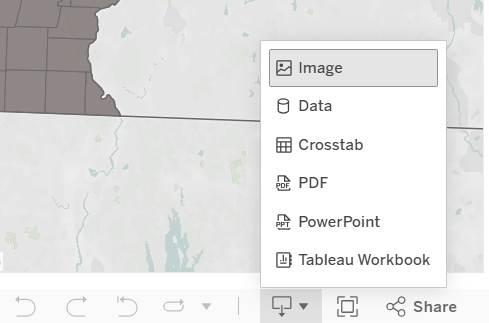
- Image: Downloads the selected view as a photo or displays the image in a new browser tab (depending on browser settings).
- Data: Displays the data from the view in a new browser window in a table with two tabs:
- Summary: contains aggregated data for the fields shown in the view.
- Underlying: contains underlying data for the selected fields in the display.
- Crosstab: Saves the underlying data for the selected fields in the visualization to a CSV (comma-separated values) file which can then be opened in Microsoft Excel.
- PDF: Downloads the selected view as a PDF or displays the PDF in a new browser tab (depending on browser settings).
-
Powerpoint: Downloads a Powerpoint file containing the selected view as an image
Download troubleshooting:
- The data and crosstab options may be grayed out (i.e. not clickable) on the download menu. To activate these options, you may need to interact with the view. The easiest way to do this is to double click on any data point within the table or graph.
- Sometimes when data is downloaded as a crosstab, Tableau will organize data from a graph or table in a different way than users might expect. To get more usable downloads, choose the "Data" option in the download menu, which will open the view in a new browser window in a table with two tabs. Select the "Full data" tab. Then click the hyperlink that says "Download all rows as a text file". This will open a csv (comma separated value) file, which can be saved to your computer as an Excel workbook.
- Tableau will only download data from the options selected in the filters. If you wish to download the entire data set, you must select "all" in every field. This may overload the visualization since the visualization does not have room to display the chosen data. However, you can still download the selected data in a table or crosstab, even if the visualization itself cannot display all those fields.
- If there are multiple graphs and tables on the view, Tableau will only download data/crosstabs from the last table or graph clicked on. You cannot download from multiple visualizations at one time. Some visualizations have summary tables at the bottom of the page to facilitate convenient download.
- If the file does not download or the new window does not open, you may need to disable your browser's pop-up blocker.
- Tableau does not allow users to copy text within a visualization on a screen. The best workaround is to download the viz as a PDF and then copy and paste text from there.